Astro 5.9: Revolutionizing Web Security with Built-in Content Security Policy Support
Web security has never been more critical. With the rise of sophisticated cross-site scripting (XSS) attacks, developers need robust tools to protect their applications. Astro 5.9 delivers exactly that with its game-changing experimental Content Security Policy (CSP) support—making it the most requested feature finally available to the community.
🔒 The Security Challenge: Understanding XSS Attacks
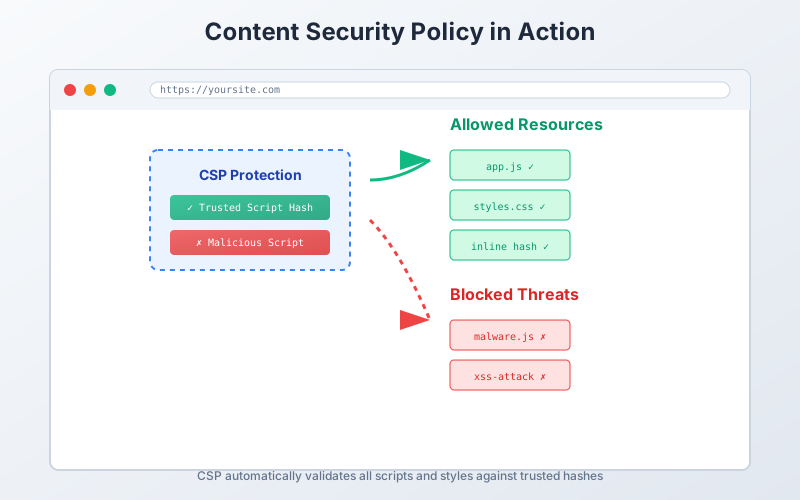
Cross-site scripting attacks remain one of the most prevalent threats facing modern web applications. By default, web pages can load scripts and styles from anywhere, creating potential attack vectors. A Content Security Policy acts as a powerful defense mechanism by restricting which resources can be loaded and executed.
Why Traditional CSP Implementation is Complex
Implementing CSP manually involves several challenges:
- Script and Style Enumeration: You need to track every script and stylesheet
- Hash Generation: Computing SHA-256/SHA-512 hashes for inline content
- Dynamic Content: Handling runtime-generated scripts and styles
- Framework Compatibility: Ensuring CSP works across different rendering modes
🚀 Astro’s CSP Innovation: A Universal Solution
What makes Astro 5.9’s CSP implementation revolutionary is its universal compatibility. Unlike solutions that work only with specific hosting environments, Astro’s approach works everywhere:
- ✅ Static hosting (GitHub Pages, Netlify, Vercel)
- ✅ Serverless functions (AWS Lambda, Cloudflare Workers)
- ✅ Traditional servers (Node.js, Deno)
- ✅ Single Page Applications (SPAs)
- ✅ Server-Side Rendering (SSR)
The Technical Approach: Hash-based CSP
Astro chose hash-based CSP over nonce-based implementation for maximum compatibility:
---
// Astro automatically generates hashes for all scripts and styles
import { defineConfig } from "astro/config"

export default defineConfig({
  experimental: {
    csp: true
  }
})
---
This generates a <meta> element with calculated hashes:
<meta
  http-equiv="content-security-policy"
  content="script-src 'sha256-abc123...' 'sha256-def456...'; style-src 'sha256-xyz789...'"
/>
🛠️ Getting Started with Astro CSP
Basic Configuration
Enable CSP with a simple configuration flag:
// astro.config.mjs
import { defineConfig } from 'astro/config';

export default defineConfig({
  experimental: {
    csp: true,
  },
});
Advanced Configuration
For more control, customize the CSP implementation:
// astro.config.mjs
import { defineConfig } from 'astro/config';

export default defineConfig({
  experimental: {
    csp: {
      // Change the default algorithm
      algorithm: 'SHA-512',

      // Insert additional directives
      directives: [
        "default-src: 'self'",
        "image-src: 'https://images.cdn.example.com'",
      ],

      // Configure style directives
      styleDirective: {
        hashes: [
          'sha384-somehash', // External styles
        ],
        resources: ['self', 'https://styles.cdn.example.com'],
      },

      // Configure script directives
      scriptDirective: {
        hashes: [
          'sha384-anotherhash', // External scripts
        ],
        resources: ['self', 'https://script.cdn.example.com'],
        scriptDynamic: true, // Enable strict-dynamic
      },
    },
  },
});
🔧 New Features in Astro 5.9
1. Markdown Rendering in Content Loaders
Content loaders now support direct Markdown rendering with the new renderMarkdown helper:
import type { Loader } from 'astro/loaders';

export function myLoader(settings): Loader {
  return {
    name: 'my-loader',
    async load({ renderMarkdown, store }) {
      const entries = await loadFromCMS();

      for (const entry of entries) {
        store.set(entry.id, {
          id: entry.id,
          data: entry,
          rendered: await renderMarkdown(entry.content),
        });
      }
    },
  };
}
2. Responsive Images Style Control
New configuration for experimental responsive images:
export default {
  image: {
    experimentalDefaultStyles: false, // Disable default styles
  },
  experimental: {
    responsiveImages: true,
  },
};
3. Enhanced Adapter Logging
Adapters can now suppress default Astro logging for better UX:
setAdapter({
  name: 'my-astro-integration',
  supportedAstroFeatures: {
    staticOutput: 'stable',
    hybridOutput: 'stable',
    sharpImageService: {
      support: 'limited',
      message: 'Custom message for users',
      suppress: 'default', // Suppress Astro's default message
    },
  },
});
🎯 Real-World Implementation Example
Here’s how you might implement CSP in a typical Astro project:
---
// pages/secure-page.astro
---

<html>
<head>
  <title>Secure Page with CSP</title>
  <!-- Astro automatically injects CSP meta tag here -->
</head>
<body>
  <main>
    <h1>Protected Content</h1>

    <!-- This inline script will be automatically hashed -->
    <script>
      console.log('This script is CSP-protected!');
    </script>

    <!-- External scripts need to be allowlisted -->
    <script src="https://trusted-cdn.com/script.js"></script>
  </main>
</body>
</html>
🔄 Migration from Manual CSP
If you’re already using manual CSP implementation:
// Before: Manual CSP headers
app.use((req, res, next) => {
  res.setHeader(
    'Content-Security-Policy',
    "script-src 'self' 'unsafe-inline'; style-src 'self' 'unsafe-inline'"
  );
  next();
});

// After: Astro handles it automatically
export default defineConfig({
  experimental: { csp: true },
});
🚀 Performance Benefits
Astro’s CSP implementation provides several performance advantages:
1. Eliminates unsafe-inline
No more security compromises for convenience
2. Zero Runtime Overhead
Hashes are computed at build time
3. Framework Agnostic
Works with React, Vue, Svelte, and vanilla JavaScript
4. Progressive Enhancement
Graceful degradation when CSP is not supported
🔮 Future Roadmap
Astro’s CSP feature is currently experimental, but the roadmap includes:
- Stable release in a future version
- Additional algorithms support (SHA-384, SHA-512)
- Nonce support for specific use cases
- Integration with popular security tools
- Enhanced debugging capabilities
🛡️ Security Best Practices
When implementing CSP with Astro:
1. Start Simple
experimental: {
  csp: true;
}
2. Test Thoroughly
- Monitor browser console for CSP violations
- Test across different deployment environments
- Verify third-party integrations work correctly
3. Gradual Enhancement
// Start permissive, then tighten
experimental: {
  csp: {
    directives: [
      "default-src: 'self'",
      "script-src: 'self' 'unsafe-eval'", // Remove unsafe-eval gradually
    ];
  }
}
4. Monitor Violations
Set up CSP reporting to track potential security issues:
directives: ['report-uri: /csp-violation-report-endpoint'];🎉 Why This Matters for the Astro Ecosystem
Astro 5.9’s CSP support represents a significant milestone:
- Security First: Making security a default consideration, not an afterthought
- Developer Experience: Simplifying complex security implementations
- Universal Compatibility: Working across all deployment environments
- Community Response: Addressing the #1 most requested feature
🔧 Troubleshooting Common Issues
Issue: CSP blocks external scripts
Solution: Add trusted domains to script directive
scriptDirective: {
  resources: ['self', 'https://trusted-domain.com'];
}
Issue: Inline styles not working
Solution: Ensure experimental CSP is properly configured
experimental: {
  csp: {
    styleDirective: {
      resources: ['self', "'unsafe-inline'"]; // Temporary fallback
    }
  }
}
🚀 Getting Started Today
Ready to enhance your Astro site’s security? Here’s your action plan:
-
Upgrade to Astro 5.9:
npx @astrojs/upgrade -
Enable experimental CSP:
experimental: { csp: true; } -
Test your application thoroughly
-
Monitor for violations and adjust configuration
-
Share your experience with the Astro community
🎯 Conclusion
Astro 5.9’s Content Security Policy support represents a paradigm shift in how we approach web security. By making CSP implementation seamless and universal, Astro empowers developers to build secure applications without sacrificing development velocity or deployment flexibility.
The experimental nature of this feature means now is the perfect time to test it, provide feedback, and help shape its evolution toward stable release. With features like enhanced Markdown rendering in content loaders and improved responsive image controls, Astro 5.9 continues to solidify its position as the framework that truly works everywhere.
Whether you’re building a simple blog or a complex application, Astro’s CSP implementation provides the security foundation your project needs in today’s threat landscape.
Ready to secure your Astro site? Start experimenting with CSP today and join the conversation in the Astro Discord community to share your experiences and learn from other developers.
For more insights on modern web development and security practices, follow me on Twitter and check out my other articles on emerging web technologies.
Discussion