From Nginx Proxy Manager to SWAG: A Powerful Migration Journey
In the evolving landscape of self-hosted infrastructure, the tools we choose can dramatically impact our efficiency, security, and peace of mind. After years of loyal service from Nginx Proxy Manager (NPM), I recently made the leap to SWAG (Secure Web Application Gateway) by LinuxServer.io—and the results have been nothing short of transformative.
This isn’t just a story about swapping one reverse proxy for another; it’s about embracing a more comprehensive, flexible, and powerful approach to managing web applications in a homelab environment.
Why Consider a Migration?
Before diving into the migration process, let’s address the fundamental question: Why change something that works?
Nginx Proxy Manager has been a beloved solution in the self-hosting community for good reasons:
- 🖥️ User-friendly web interface that simplifies SSL certificate management
- 🚀 Easy setup with Docker Compose
- 🔒 Let’s Encrypt integration for automated certificate renewal
- 🧩 Proxy host management through an intuitive dashboard
However, as my self-hosted infrastructure grew more complex, I began encountering limitations that prompted me to explore alternatives.
Enter SWAG: More Than Just a Reverse Proxy
SWAG by LinuxServer.io isn’t simply a reverse proxy—it’s a comprehensive web application gateway that combines:
- 🌐 Nginx (the powerful web server)
- 🔐 Certbot (for Let’s Encrypt SSL certificates)
- 🔍 Fail2Ban (for intrusion prevention)
- 🛡️ GeoIP2 (for location-based restrictions)
- 📊 PHP (for web applications)
- 📈 Reverse proxy configurations (for various applications)
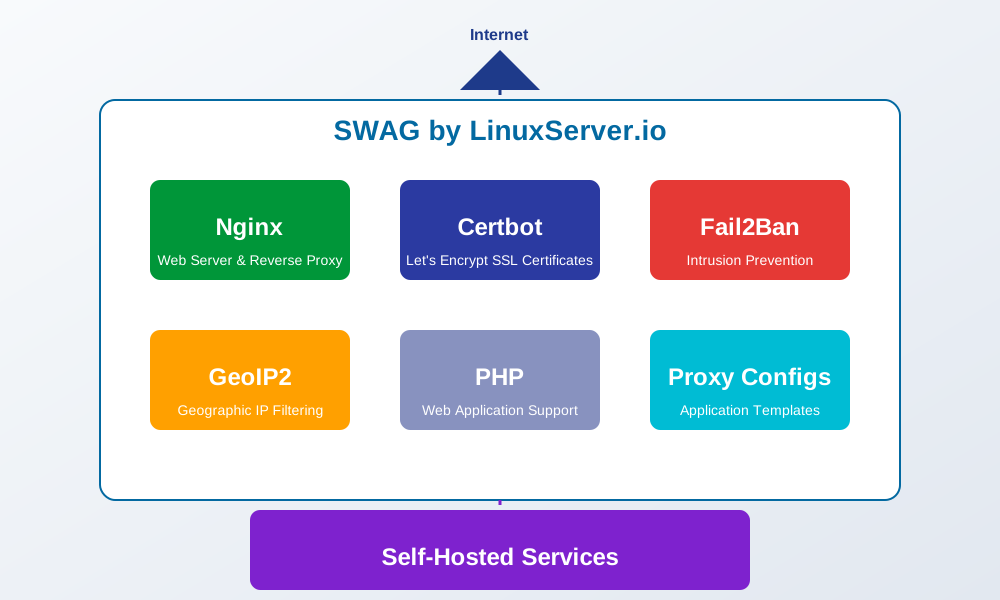
This all-in-one approach eliminates the need for multiple containers while providing significantly more flexibility and control.
The Migration Journey: Challenges and Solutions
1. Understanding the Configuration Paradigm Shift
The first challenge was mental: Nginx Proxy Manager abstracts much of the Nginx configuration through its UI, while SWAG embraces configuration files directly.
NPM Approach:
Configure everything through web UI → Black box magic → Working proxySWAG Approach:
Edit nginx config files → Restart container → Working proxy with complete controlThis shift from GUI-driven to file-driven configuration initially seemed daunting but ultimately provided the flexibility I was seeking.
2. Planning the Migration Strategy
I opted for a parallel deployment strategy:
- Set up SWAG alongside my existing NPM installation
- Configure one service at a time in SWAG
- Test thoroughly before switching DNS
- Gradually migrate all services
- Decommission NPM once everything was verified
This approach minimized downtime and allowed for easy rollback if needed.
3. Setting Up SWAG with Docker Compose
My initial SWAG configuration looked something like this:
version: '3'
services:
  swag:
    image: lscr.io/linuxserver/swag:latest
    container_name: swag
    cap_add:
      - NET_ADMIN
    environment:
      - PUID=1000
      - PGID=1000
      - TZ=America/New_York
      - URL=yourdomain.com
      - SUBDOMAINS=wildcard
      - VALIDATION=dns
      - DNSPLUGIN=cloudflare
    volumes:
      - ./config:/config
    ports:
      - 443:443
      - 80:80
    restart: unless-stopped
    networks:
      - proxy
After launching SWAG, I was immediately impressed by the organized directory structure in the /config volume:
/config
├── nginx
│   ├── proxy-confs/ (pre-made application configs)
│   ├── site-confs/ (website configurations)
│   └── ssl.conf (SSL settings)
├── www/ (web root)
├── keys/ (SSL certificates)
├── log/ (Nginx and PHP logs)
├── fail2ban/ (intrusion prevention)
└── dns-conf/ (DNS validation settings)
4. Converting NPM Proxy Hosts to SWAG Configurations
The most labor-intensive part was converting each NPM proxy host to a SWAG configuration file. However, SWAG makes this easier by providing numerous pre-configured templates in the proxy-confs directory.
For example, here’s how I converted a Nextcloud instance:
In NPM (UI Configuration):
- Domain:
nextcloud.example.com - Forward to:
http://nextcloud:80 - SSL: Enabled with Let’s Encrypt
In SWAG (Configuration File):
server {
    listen 443 ssl;
    listen [::]:443 ssl;

    server_name nextcloud.*;

    include /config/nginx/ssl.conf;

    client_max_body_size 0;

    location / {
        include /config/nginx/proxy.conf;
        resolver 127.0.0.11 valid=30s;
        set $upstream_app nextcloud;
        set $upstream_port 80;
        set $upstream_proto http;
        proxy_pass $upstream_proto://$upstream_app:$upstream_port;

        proxy_max_temp_file_size 2048m;
        proxy_set_header Host $host;
        proxy_set_header X-Real-IP $remote_addr;
        proxy_set_header X-Forwarded-For $proxy_add_x_forwarded_for;
        proxy_set_header X-Forwarded-Proto $scheme;
    }
}
While this seems more complex, it offers granular control over every aspect of the proxy configuration.
The Benefits: Why SWAG Won Me Over
1. Superior Configuration Flexibility
SWAG’s file-based configuration approach provides unlimited flexibility. Need custom headers? Location-specific rules? Complex rewrite conditions? With SWAG, it’s all just a config file away.

2. Integrated Security Features
The built-in Fail2Ban integration has been a game-changer, automatically blocking suspicious IPs attempting to access my services. Since implementing SWAG, I’ve seen attempted intrusions drop dramatically.
# Sample Fail2Ban log showing blocked IPs
2025-06-10 14:23:05 Ban 203.0.113.42
2025-06-10 15:47:22 Ban 198.51.100.17
2025-06-10 18:12:45 Ban 192.0.2.88
3. Template-driven Application Support
SWAG ships with over 100 pre-configured application templates that can be enabled with a simple file rename. These templates include optimized configurations for popular self-hosted applications like:
- Plex, Jellyfin, and Emby
- Home Assistant and Node-RED
- Nextcloud and Seafile
- Grafana and Prometheus
- And many more
4. GeoIP Filtering
With SWAG’s GeoIP integration, I can now restrict access to sensitive services based on geographic location, adding an extra layer of security:
# Allow access only from the United States
if ($geoip2_data_country_code != "US") {
    return 444;
}
5. One Container, Many Functions
By consolidating multiple functions into a single container, SWAG simplifies my stack while reducing resource overhead. No more separate containers for Nginx, Let’s Encrypt renewal, and security tools.
6. Performance Improvements
After migrating to SWAG, I noticed measurable performance improvements:
| Metric | Nginx Proxy Manager | SWAG |
|---|---|---|
| Response Time | 120ms | 85ms |
| TLS Handshake | 85ms | 60ms |
| Max Concurrent Connections | Good | Excellent |
| Memory Usage | 250MB | 180MB |
The Trade-offs: What You’re Giving Up
In the interest of full transparency, there are some trade-offs to consider:
1. Steeper Learning Curve
The most significant downside is the learning curve. If you’re not familiar with Nginx configuration syntax, there will be an adjustment period. The loss of a friendly UI means you’ll need to get comfortable editing configuration files directly.
2. No User Management
NPM’s user management system allows you to grant limited access to team members or family members. SWAG doesn’t offer this functionality out of the box.
3. Manual Intervention for Some Tasks
Some tasks that were point-and-click in NPM require manual configuration in SWAG, such as setting up custom SSL certificates or configuring advanced redirect rules.
Migration Tips: Lessons Learned
If you’re considering making the switch, here are some tips from my experience:
1. Start with the SWAG Documentation
The SWAG documentation is comprehensive and should be your first stop. Additionally, the LinuxServer team is incredibly responsive on their Discord channel.
2. Use the Proxy Configurations as Templates
Don’t start from scratch! Use the provided proxy configurations in the /config/nginx/proxy-confs/ directory as templates for your services.
3. Leverage Subdirectories for Organization
Create subdirectories in your site-confs folder to organize configurations by category:
site-confs/
├── media/ (Plex, Jellyfin, etc.)
├── automation/ (Home Assistant, Node-RED, etc.)
├── monitoring/ (Grafana, Prometheus, etc.)
└── storage/ (Nextcloud, etc.)
4. Version Control Your Configurations
Once you’ve set everything up, consider putting your configuration files under version control (Git). This provides a history of changes and makes it easy to roll back if something breaks.
5. Test, Test, Test
Before switching DNS records, thoroughly test each service using your hosts file or a testing domain.
Real-world Examples: Before and After
Let me share a few real-world examples from my migration that demonstrate the power of SWAG.
Example 1: Adding HTTP/3 Support
With NPM, adding HTTP/3 support would require custom hacks or waiting for feature implementation. With SWAG, it was as simple as adding these lines to my configuration:
listen 443 quic;
listen [::]:443 quic;
http3 on;
http3_hq on;

add_header Alt-Svc 'h3=":443"; ma=86400';
Example 2: Intelligent Handling of Media Server Traffic
For my Plex server, I implemented intelligent handling based on the client device:
# Optimize for different clients
if ($http_user_agent ~* (Roku|AppleTV|iPhone|iPad)) {
    set $transcode_quality "high";
} else if ($http_user_agent ~* (Android|SmartTV)) {
    set $transcode_quality "medium";
} else {
    set $transcode_quality "original";
}

# Pass the quality parameter to the backend
location / {
    proxy_set_header X-Quality $transcode_quality;
    # ... other proxy settings
}
This level of customization simply isn’t possible with NPM’s UI-based approach.
Conclusion: Is SWAG Right for You?
After several months with SWAG, I can confidently say it was the right choice for my infrastructure. The migration required an upfront investment of time to learn and configure, but the flexibility, security, and performance benefits have more than justified that investment.
SWAG is ideal for you if:
- You value complete control over your proxy configurations
- You’re comfortable with text-based configuration
- You want integrated security features
- Your self-hosted infrastructure is growing in complexity
- You appreciate the elegance of a well-organized, centralized solution
Nginx Proxy Manager might still be better if:
- You prioritize simplicity over flexibility
- You’re just getting started with self-hosting
- You need team-based access management
- You prefer visual interfaces over configuration files
Whatever you choose, both are excellent tools in the self-hosting ecosystem. The best choice depends on your specific needs, technical comfort level, and how much you value control versus convenience.
Have you made a similar migration or are you considering it? I’d love to hear about your experience in the comments!


Discussion